

🚀 Introduction: Why People Want to Download YouTube Shorts
YouTube Shorts are short-form videos that pack a punch in just 60 seconds or less. Whether it’s a funny clip, a tutorial, or a cool dance trend—you’ve probably found yourself wanting to download that short to your gallery to watch later or share with friends. The problem? YouTube doesn’t make it easy.
That’s where this guide comes in! We’ll show you fast, easy, and safe methods to download YouTube Shorts in 2025—whether you’re on Android, iPhone, or PC.
📌 Why Download YouTube Shorts?
Short but Powerful Entertainment
Sometimes you come across a Short that’s too good to scroll past. Downloading lets you keep it forever.
For Offline Viewing
No internet? No problem. Downloaded Shorts are perfect for travel, poor network zones, or saving data.
To Share or Reuse in Edits
Creators might want to re-edit clips or use them as inspiration (just make sure to give credit!).
📜 Is It Legal to Download YouTube Shorts?
YouTube’s Policy Explained
YouTube doesn’t officially allow downloading videos (except via Premium). However, third-party tools are widely used for personal offline use.
Ethical Considerations
Downloading for personal use is usually fine. But don’t re-upload others’ content without permission—it can lead to copyright strikes.
💡 5 Easy Ways to Download YouTube Shorts in 2025
Method 1: Online Websites (No App Needed)
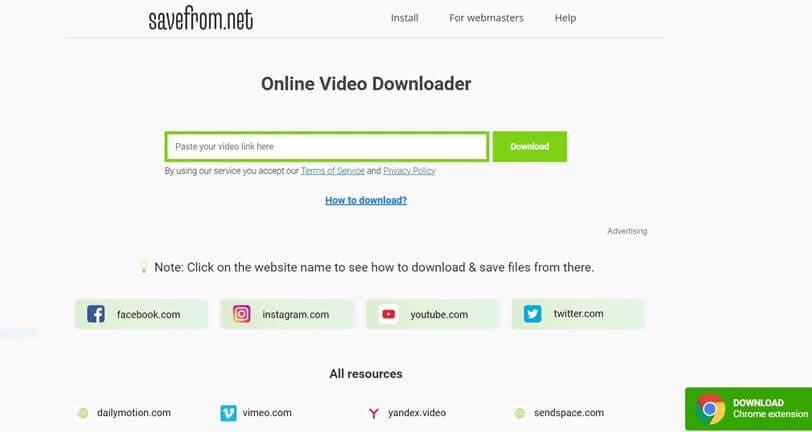
- Go to YouTube and copy the Short’s URL.
- Open a site like SnapSave.io or SaveTube.me.
- Paste the link and tap “Download.”
- Choose the quality and format.
- Done!
Method 2: Using Mobile Apps (Android & iOS)

Popular apps like Snaptube, VidMate, and TubeMate make downloading easy. Just:
- Paste the URL
- Pick your resolution
- Save directly to your gallery
iPhone users can use apps like Documents by Readdle for browser-based downloads.
Method 3: Browser Extensions (For PC & Laptop)

Chrome/Edge extensions like:
- Video DownloadHelper
- SaveFrom.net Helper
Let you download directly from YouTube pages.
Method 4: Screen Recorders (When All Else Fails)
If a site or app fails, record the screen using:
- Android/iOS built-in screen recorders
- OBS Studio (for PC)
Method 5: Using Telegram Bots
Search “YouTube Shorts Downloader” bots in Telegram. Paste the link, and the bot sends back the file.
🛠️ Best YouTube Shorts Downloader Tools in 2025
SnapSave.io
✅ Fast and clean
❌ Ads on the page
SaveTube.me
✅ Supports multiple formats
❌ Interface can be confusing
SSYouTube.com
✅ Simple and mobile-friendly
❌ Sometimes slow
Publer
✅ No watermark
❌ May have popup ads
4K Video Downloader
✅ High-quality download (PC)
❌ Requires installation
👍 Pros and Cons of Using Downloader Tools
The Good
- Easy and quick
- Free options available
- Many support HD
The Not-so-Good
- Popups and ads
- Some tools inject watermarks
- Not all are secure
📂 How to Save Shorts to Gallery (Step-by-Step)
For Android Users
- Use Snaptube or SaveTube.me
- Tap “Download”
- Check Downloads or Gallery
For iPhone Users
- Use Documents by Readdle or screen recording
- Save the video to Files or Camera Roll
📱 Best Apps to Download YouTube Shorts
TubeMate
- Popular and reliable
- Supports multiple sites
VidMate
- Download videos + MP3
- Has built-in browser
YTD Video Downloader
- PC-friendly
- Simple UI
Snaptube
- Fast, clean UI
- Android only
💻 Download YouTube Shorts on PC or Laptop
Using Chrome Extensions
- Install Video DownloadHelper
- Navigate to a Short
- Click the extension icon and download
Using Dedicated Software
- Use 4K Video Downloader
- Paste the URL and select quality
🧼 Download YouTube Shorts Without Watermark
Some sites like ShortsNoWatermark and tools like 4K Downloader provide clean, watermark-free files—perfect for reuse or presentation.
🛡️ Tips to Stay Safe When Downloading
Avoiding Malware
- Stick to trusted websites
- Avoid shady popups and apps
Checking Permissions
- Don’t grant apps access to unnecessary data like SMS, contacts, etc.
✅ Conclusion: Save Shorts, Your Way!
There you go—multiple fast and easy ways to download YouTube Shorts in 2025! Whether you’re on Android, iOS, or PC, there’s a method for everyone. Just pick one and save that viral video before it disappears!
Try one of these methods and save your favorite Shorts today! 🎥💾
❓ FAQs
1. Is it safe to download YouTube Shorts using third-party tools?
Yes, but use well-known and trusted websites or apps to avoid malware.
2. Can I download Shorts without watermark?
Absolutely! Tools like ShortsNoWatermark and 4K Downloader work great for that.
3. What’s the best app for Android to download Shorts?
Snaptube or VidMate—both are fast and free.
4. How do I download Shorts on iPhone?
Use Documents by Readdle or the built-in screen recorder.
5. Are these methods legal?
Downloading for personal use is generally okay. Avoid re-uploading or using others’ content commercially without permission.
Please don’t forget to leave a review.